Published 2026-11-10
VPS Reverse DNS: Who Controls the PTR Record?
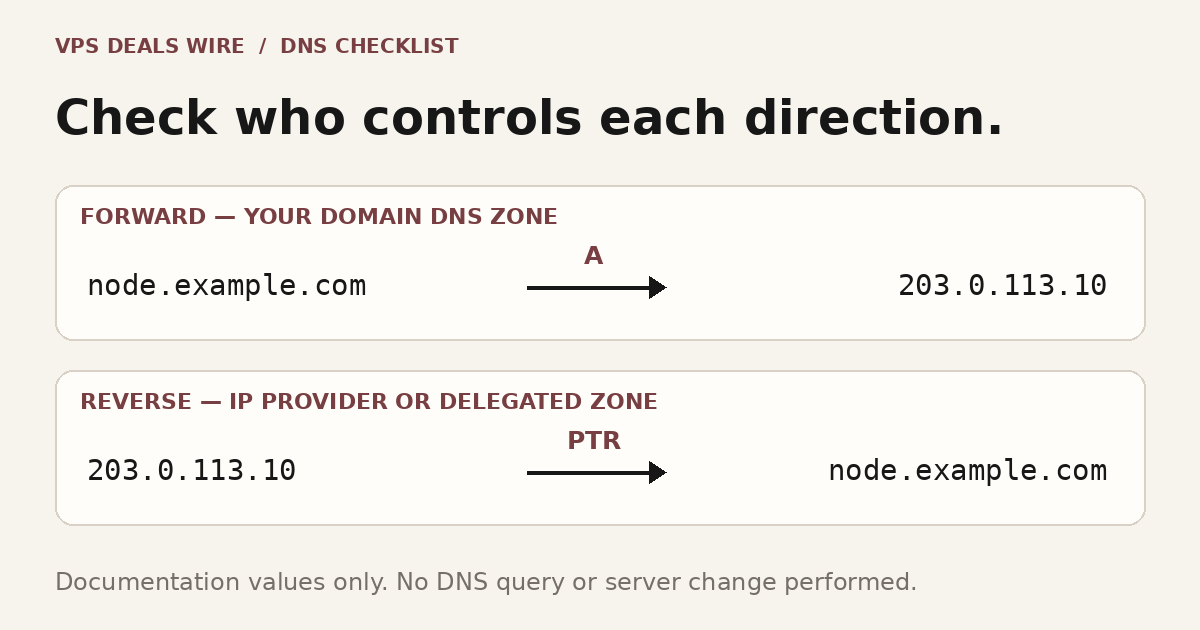
A forward DNS record and a reverse DNS record answer different questions and may be controlled in different places. Before buying a VPS for a task that needs a particular reverse hostname, confirm who can change the PTR record for the exact public address. Editing an A record in your domain’s DNS zone does not, by itself, change the reverse record for that IP.
In this guide
Start with the direction of the lookup
A forward lookup asks which address belongs to a hostname. A reverse lookup starts with an address and asks for its associated name. PTR is the DNS record type used for the pointer data described in RFC 1035. The domain’s normal DNS zone and the address’s reverse zone are separate pieces of DNS administration, even when one company offers both controls.
For an original example, suppose the reference hostname is node.example.com and the IPv4 address is 203.0.113.10. The A record can point the hostname to that address while the PTR still returns a provider default name. These are illustrative values, not a claim about a reachable server: RFC 5737 reserves the 203.0.113.0/24 block for documentation.
Find the party with reverse-zone authority
Ask the VPS provider how reverse DNS is managed for the assigned address. It may offer a control-panel setting, require a support request, or impose product-specific conditions. Do not assume that moving your domain to another DNS host transfers the reverse zone for a provider’s IP address.
Hetzner’s reverse-DNS guide explicitly separates the PTR managed for its IP addresses from records in a customer’s domain zone. DigitalOcean’s DNS record documentation describes its own Droplet-name-based PTR behavior. Those are examples of different provider workflows, not evidence that every VPS plan exposes the same control.
For a reseller, shared address or delegated arrangement, identify the actual route to a change rather than guessing which dashboard owns it. If custom reverse DNS is essential to your intended service, get the eligibility and process clarified before committing to a plan.
Check the exact address and provider conditions
Write down the public address, intended hostname, product and account that controls it. Confirm IPv4 and IPv6 support separately, including whether a setting applies to the specific address you will use. Do not generalize one address’s behavior to an entire IPv6 allocation.
A provider can require a corresponding forward record before accepting a reverse hostname. For example, the Amazon EC2 reverse-DNS instructions require a matching forward A record for the Elastic IP. Read the conditions for your actual provider instead of treating that example as a universal VPS policy.
Also ask what happens when you replace, release or move the address. A DNS change request can have account or resource conditions beyond the editable hostname. The managed-versus-unmanaged guide helps separate provider features from tasks you remain responsible for performing.
Make a small verification record
Use a hostname under your control and the provider’s documented method. Save the intended value, previous value, address and time of the request. Avoid changing unrelated website or mail records while investigating a PTR issue.
The following commands illustrate two questions you could ask a DNS tool; they were not executed for this article and no output is reported:
dig A node.example.com +short
dig -x 203.0.113.10 +short
The first asks about the example hostname’s forward address; the second asks about reverse DNS for the documentation address. For real validation, replace the documentation values with your own hostname and assigned address. Record which resolver and time you used, and distinguish an accepted provider change from the answer currently visible through a cache.
Keep reverse DNS in its proper role
A PTR value does not demonstrate application speed, remove an IP reputation issue, or guarantee that email will be accepted. It also does not open a blocked network port. Check the separate requirements of the service you intend to run and the provider’s current terms.
Use the IPv6 buying checklist to confirm the wider address offering, then compare candidates through the provider comparison page. Treat reverse-DNS control as one documented requirement on your shortlist, not a reason to invent a “best provider” ranking. Sources were checked on October 26, 2026; confirm the current provider workflow before making a change.