Published 2026-10-20
KVM vs LXC on a Cheap VPS: Which Should You Buy? A Q&A With Real Prices
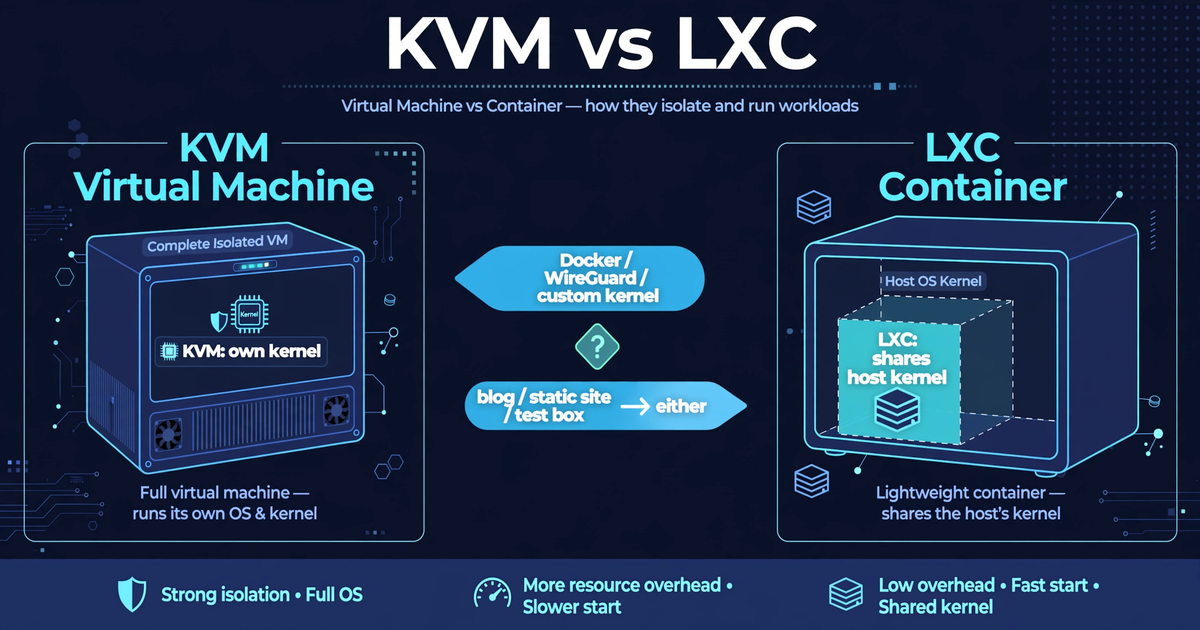
Short answer: if you will ever run Docker, WireGuard, a custom kernel module, or anything that is not Linux — buy KVM. For a static site, a WordPress blog, or a test box, the difference barely matters and you should buy on price. We audited 219 live VPS price cards (snapshot taken 2026-10-19, 32 providers): 14 cards print the word "KVM", and zero mention LXC, OpenVZ, Xen, or Hyper-V. Most of the market simply does not tell you — so this Q&A tells you when that silence matters and when it does not.
In this guide
Q1: What do KVM and LXC actually mean?
They are two different ways of splitting one physical server into many virtual ones:
- KVM is full virtualization. Your VPS gets its own virtual hardware and its own kernel. You can install any operating system the provider's template supports — including Windows or BSD — and you can load your own kernel modules.
- LXC (and its cousins OpenVZ and Virtuozzo) is container virtualization. Your VPS shares the host's kernel with every other container on the machine. You get your own filesystem, processes, and network stack — but never your own kernel.
The one-sentence version: KVM is a whole computer that happens to be virtual; LXC is a walled-off room inside someone else's computer. Everything else follows from that.
Q2: When does the difference actually matter?
Only when your workload touches the kernel — which is exactly the workloads budget buyers run. A community discussion that asks "KVM vs OpenVZ: does it matter for a cheap VPS?" lands on the same split we use:
| Workload | Buy KVM | LXC/OpenVZ is fine |
|---|---|---|
| Docker or containers | Yes — Docker needs kernel features (cgroups, namespaces, modules) that containers cannot always provide; it works on KVM without asking the host for permission | Only if the provider explicitly enables nesting |
| WireGuard VPN | Yes, safer — WireGuard lives in the kernel on modern distros; on a shared-kernel container you depend on the host having the module loaded | If the host documents WireGuard support |
| Custom kernel or modules (e.g. a special filesystem, a tuned scheduler) | Yes — you cannot load a module into a kernel you do not own | No |
| Non-Linux OS (Windows, FreeBSD) | Yes — containers only run the host's Linux | No |
| WordPress blog, static site, small API, learning Linux | Not required | Yes — these never touch the kernel |
Notice the pattern: the heavier and more "infrastructure-shaped" your plan gets, the more KVM pays for itself. The pattern also repeats our earlier findings — the cheapest plans are exactly where Docker, WireGuard, and VPN workloads land, which is why this question shows up on budget VPS deals and not on $40/month managed plans.
Q3: How do I know which one a cheap plan uses?
From the price card, you usually cannot. Here is what our 2026-10-19 snapshot actually says:
| What the card prints | Cards out of 219 | What it tells you |
|---|---|---|
| "KVM" | 14 | Full virtualization, own kernel |
| "LXC", "OpenVZ", "Xen", "Hyper-V" | 0 | Not disclosed on any card |
| Nothing about virtualization | 205 | Silence — check the FAQ or ask support |
The silence is the finding. Budget brands market on price and RAM, not on hypervisors, so the card will not volunteer the answer. Two places that do answer: the provider's FAQ or knowledge base (one budget provider's community FAQ, for example, explicitly labels its plans "KVM VPS"), and the plan page's feature list. If neither says anything, ask support before you buy — "Is this plan KVM or container-based?" is a one-line ticket, and the answer decides Q2 for you.
Q4: Is KVM worth paying more for?
Only if Q2 says yes. Here is the price math from our snapshot. The median entry plan across 23 providers with a USD entry tier costs $4.99/month; 14 of those 23 sell their entry tier at $5 or less, and 6 at $3 or less (Hostens $1.00, Latitude.sh $1.23, IONOS $2.00, Virmach $2.00, RackNerd $2.24 — all from the 2026-10-19 snapshot).
A sub-$3 container plan that cannot run your Docker stack is not cheap — it is a placeholder you will replace. The honest comparison is not "$2 container vs $5 KVM"; it is "$2 container + the afternoon you spend migrating off it vs $5 KVM that just works". Buy the virtualization your workload needs first, then optimize the price inside that set.
Q5: So what should I actually buy?
A decision rule in two lines:
- Docker, WireGuard, custom kernel, or non-Linux anywhere in your future: buy KVM on day one. Filter the plan page for the word "KVM" (14 of our 219 cards print it) or confirm with support; then pick the cheapest KVM plan that fits your RAM math.
- Blog, static site, test box, learning SSH: buy on price and ignore the hypervisor. The $4.99 median entry tier is plenty, and the workload never touches the kernel.
Our take: we buy KVM by default, because our workload list always grows into it — the Docker experiment you were not planning is the most expensive surprise a cheap plan can hold. The $2–$3 you "save" on a container plan evaporates the first weekend you rebuild somewhere else. If your plan is honestly a blog and stays a blog, take the cheapest card and never think about this again.
Data: vpsdealswire.com price snapshot 2026-10-19 (219 offers, 32 providers, 173 USD rows at $1 or more). Virtualization mentions counted from the price cards as scraped; workload guidance is general technical knowledge, not provider claims.